Last updated on
用 Obsidian 管理 Astro 内容
在尝试多种管理方案后,发现符号链接的方式最省心省力。
使用符号链接连接额外文件夹
mklink /D “符号链接的路径” “目标文件夹的路径”
CMD 管理员模式执行命令
mklink /D D:\Documents\Amen\Obsidian\AmenNotes\AmenLi\Content D:\Documents\Dev\AmenLi\src\content
创建后符号链接生成在目标文件夹里,不影响 Obsidian Vault 文件夹,也不会被同步。
具体效果如下:
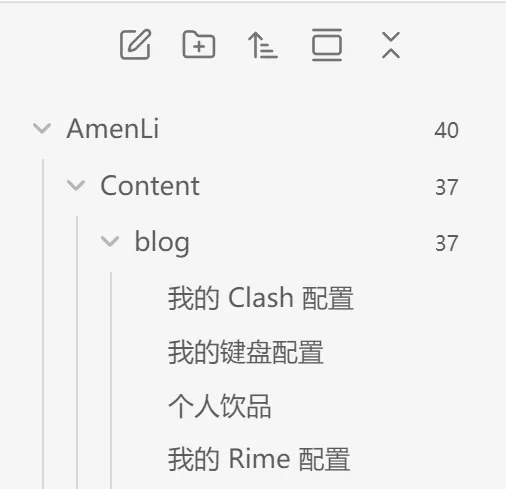
内容的具体路径:D:\Documents\Amen\Obsidian\AmenNotes\AmenLi\Content\blog
文章模板
用 Templater 插件,并让 AI 写一个模板:
---
title: <%*
    let titleInput = await tp.system.prompt("输入标题", tp.file.title);
    _tempTitleOutput = titleInput;
    await tp.file.rename(_tempTitleOutput); // 同步更新文件名
%><% `"${_tempTitleOutput}"` %>
author: "阿闷"
publishedDate: <% tp.file.creation_date("YYYY-MM-DDTHH:mm:ssZ") %>
updatedDate: <% tp.file.last_modified_date("YYYY-MM-DDTHH:mm:ssZ") %>
slug: <%*
    let slugInput = await tp.system.prompt("请输入 slug", "");
    // 将输入转换为小写,并把空格替换为连字符
    _tempSlugOutput = slugInput.toLowerCase().replace(/\s+/g, '-');
%><% `"${_tempSlugOutput}"` %>
description: <%*
    let defaultSummaryString = "未设置摘要"; // 定义跳过或空输入时的默认摘要字符串
    let userInput = await tp.system.prompt("输入摘要", ""); // 提示用户输入摘要,默认值为空
    let finalDescription = defaultSummaryString; // 默认摘要为“未设置摘要”
    if (userInput!== null) { // 如果用户没有取消
        if (typeof userInput === 'string' && userInput.trim()!== "") { // 如果用户输入是非空字符串
            finalDescription = userInput; // 使用用户输入
        }
    }
    _tempDescriptionOutput = `"${finalDescription}"`;
%><% _tempDescriptionOutput %>
tags: <%*
    let allTags = Object.keys(tp.app.metadataCache.getTags()).map(tag => tag.replace("#", ""));
    let selectedTags = [];
    while (true) {
        let availableTags = allTags.filter(tag => !selectedTags.includes(tag));
        // Sort available tags alphabetically, then prepend "完成" and "添加新标签"
        let options = ["完成", "添加新标签"].concat(availableTags.sort());
        let choice = await tp.system.suggester(options, options);
        if (choice === "完成") {
            break;
        } else if (choice === "添加新标签") {
            let newTag = await tp.system.prompt("输入新标签");
            if (newTag) {
                selectedTags.push(newTag.trim());
                // Add the new tag to allTags so it's available for selection in the future
                if (!allTags.includes(newTag.trim())) {
                    allTags.push(newTag.trim());
                }
            }
        } else {
            selectedTags.push(choice);
        }
    }
let finalTagOutput = selectedTags.length > 0 ? "\n" + selectedTags.map(tag => `  - "${tag}"`).join("\n") : "";
_tempTagOutput = finalTagOutput;
%><% _tempTagOutput %>
---
<%* await tp.file.move("AmenLi/" + _tempTitleOutput) %>
模板可能遇到的 BUG:
-
Templater: Create new note from template这个命令最好在空白文件或者未打开文件下使用。因为不知道为什么,如果打开任意非空文件,并使用上面命令,Templater 会把已打开的文件内容转移到使用模板创建的文件里。 -
模板里
file.move命令需要要求目标文件夹是展开状态,不展开不会移动。
上传到 Github 仓库
Astro 项目文件夹直接用 VSCode 打开,让 GitHub Copilot 生成提交信息,推送到 Github 仓库即可。
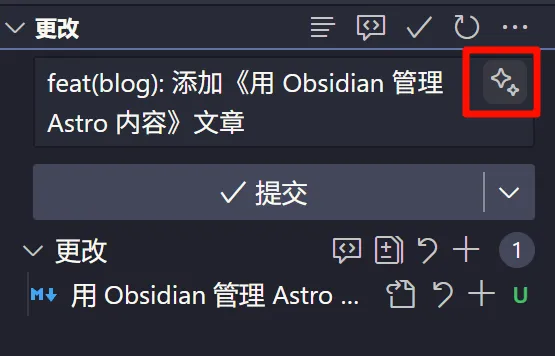
待测试
理论上,推送到 Github 仓库应该可以通过 Obsidian Git 来完成,不过之前初步配置尝试并未成功,以后有空再试试是否可行。可能是 repo 和 .git 的路径配置不对。
理想情况下,Obsidian Vault 做主仓库,Astro 项目使用 Git Submodule 并入,一起管理同步。但实际操作有点麻烦,再说。